
Sandboxing Agents That Run Code
Give an agent a shell and you have given it your shell.
Same home directory. Same SSH keys sitting in it. Same cloud credentials in the environment, same open network connection. The agent does not need to be malicious for this to go wrong. It needs to be obedient, following an instruction that arrived inside a web page, a package README, or a tool result you asked it to read. Prompt injection stops being a content problem the moment the reader can execute commands.
The usual first answer is permission prompts, a human approving each command before it runs. That decays in practice. Approving the fortieth command of a session is not a review, it's a reflex. Anthropic reports that sandboxing safely reduced permission prompts by 84% in its internal usage with Claude Code. Fewer prompts, applied where they matter, beat more prompts applied everywhere.
A prompt asks. A boundary refuses.
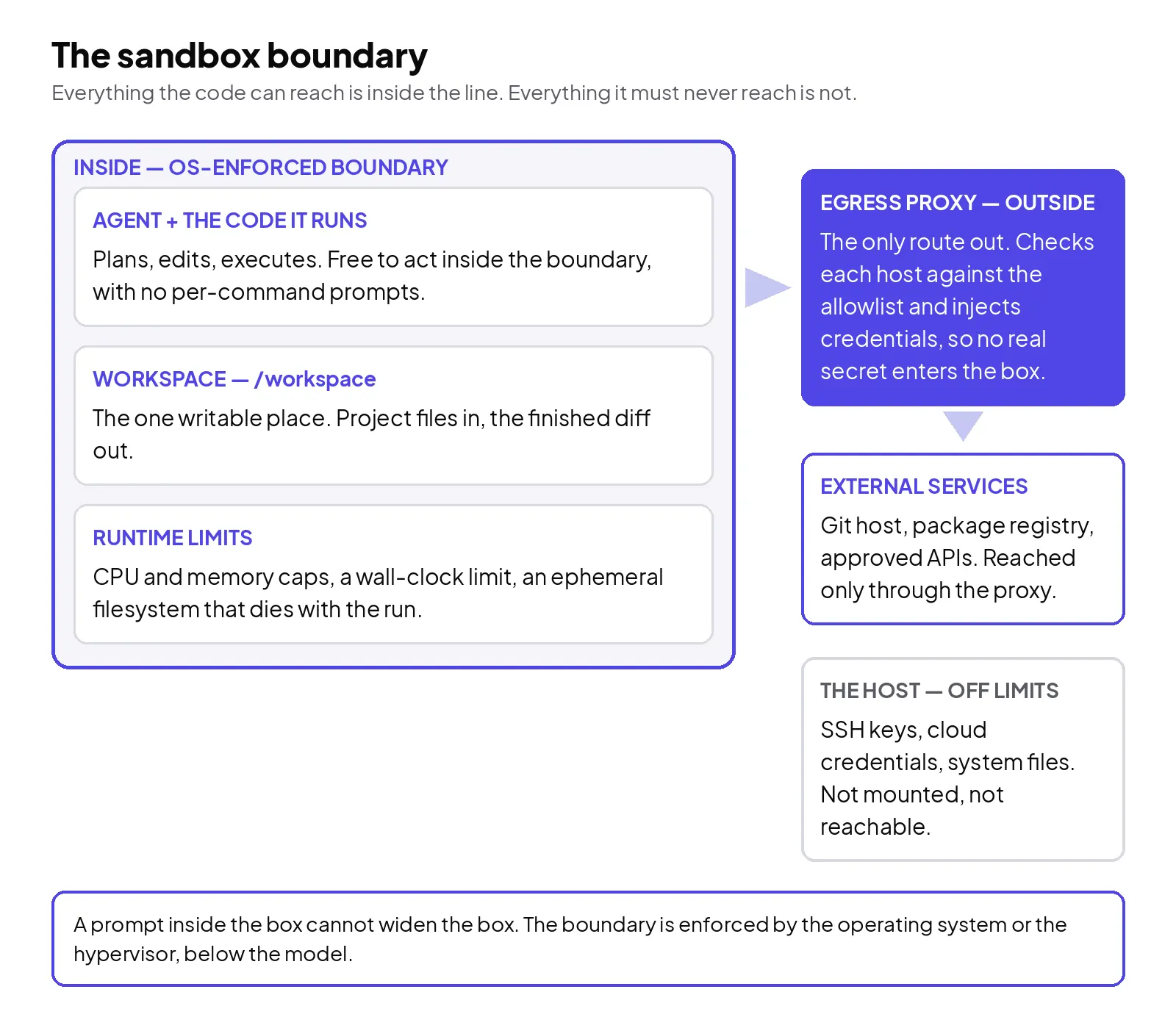
A sandbox (the isolated environment an agent's code runs in, in this post) is a boundary enforced below the agent, by the operating system or a hypervisor, not by the model's good behaviour. It is a short list of allowances. These directories may be read, these may be written. These network hosts may be reached. This much CPU and memory, for this long. Inside the list, the agent works freely and nobody approves anything. Outside it, a strict configuration has nothing to approve either: the call fails the way a call to a nonexistent file fails. Looser configurations soften the refusal into a notification and a chance to run the command outside the boundary instead, and that softness is the permission prompt creeping back in through the side door.
That placement is the whole argument. A system prompt that says "never read files outside the project" is advice the model can be talked out of by the next document it reads. An operating-system boundary cannot be talked out of anything. It also covers the part teams forget: the scripts, installers and subprocesses a command spawns. A boundary drawn around the parent has to hold for all of them, and the sandboxed Bash tool in Claude Code is built that way: its limits apply to every process a command starts, too.
Two walls, not one
The boundary needs a filesystem wall and a network wall, and each one is pointless alone. Filesystem isolation without network control still lets a script send anything it can read, anywhere. Network isolation without filesystem control still lets it read and alter the machine it lives on, including the configuration of the very proxy meant to contain it.
Together they close the loop. The filesystem wall says the working directory is the only writable place, and the paths that matter cannot be read at all. The network wall says there is no direct route out: traffic passes through a proxy running outside the sandbox, and the proxy checks each destination against an allowlist of domains.
The read half of that wall is the one teams leave open by accident. Claude Code's documentation is blunt about its own default: sandboxed commands can read most of the machine, credential files included, unless those paths are explicitly denied. A sandbox switched on with its read defaults untouched still lets a manipulated script read your keys; it just cannot send them anywhere while the network wall holds. Deny the credential paths explicitly. Do not let one wall cover for the other.
Credentials get the same treatment, and this is the part worth copying even if you copy nothing else. The real secret never enters the sandbox. Cloudflare's sandbox platform does this as secure credential injection: an egress proxy adds authentication to outgoing calls at the network layer, so the agent can use a service without ever holding its credential. If the code inside is compromised, there is no key inside to steal; the proxy authenticates only specific requests, to specific hosts.
Match the boundary to the tenant
Not every deployment needs the same strength of wall. Overspending here is its own failure: a sandbox so slow or so locked down that the agent cannot install a dependency will be switched off by Friday.
For a single developer's own agent on their own machine, an OS-level sandbox is usually the right weight: Linux bubblewrap and macOS Seatbelt primitives, with no container to spin up or manage. The threat is a manipulated agent reaching beyond the project, and the OS boundary answers it.
For shared infrastructure (many sessions, many users, code you did not write), you want a kernel between the workload and the host. An application kernel such as gVisor intercepts the container's system calls and services most of them in user space, limiting what reaches the host kernel directly, which is why Google Cloud offers it as GKE Sandbox for pods that need hardening. A step beyond that, a microVM gives each workload its own kernel behind a hypervisor. Firecracker microVMs were built at AWS for this multi-tenant case, and the project's own figures put boot time under 125 milliseconds, with under 5 MiB of memory overhead per microVM. Isolation priced in milliseconds.
Whichever layer you pick, three settings matter as much as the layer: a wall-clock limit, so a runaway loop dies on its own; resource caps, so one session cannot starve the host; and an ephemeral filesystem, so anything the run created dies with it unless deliberately exported.
One run, traced
Take a typical run, configured the way this post argues for, and watch where the walls meet the work. The task: clone a repository, run its test suite, fix the one failing test.
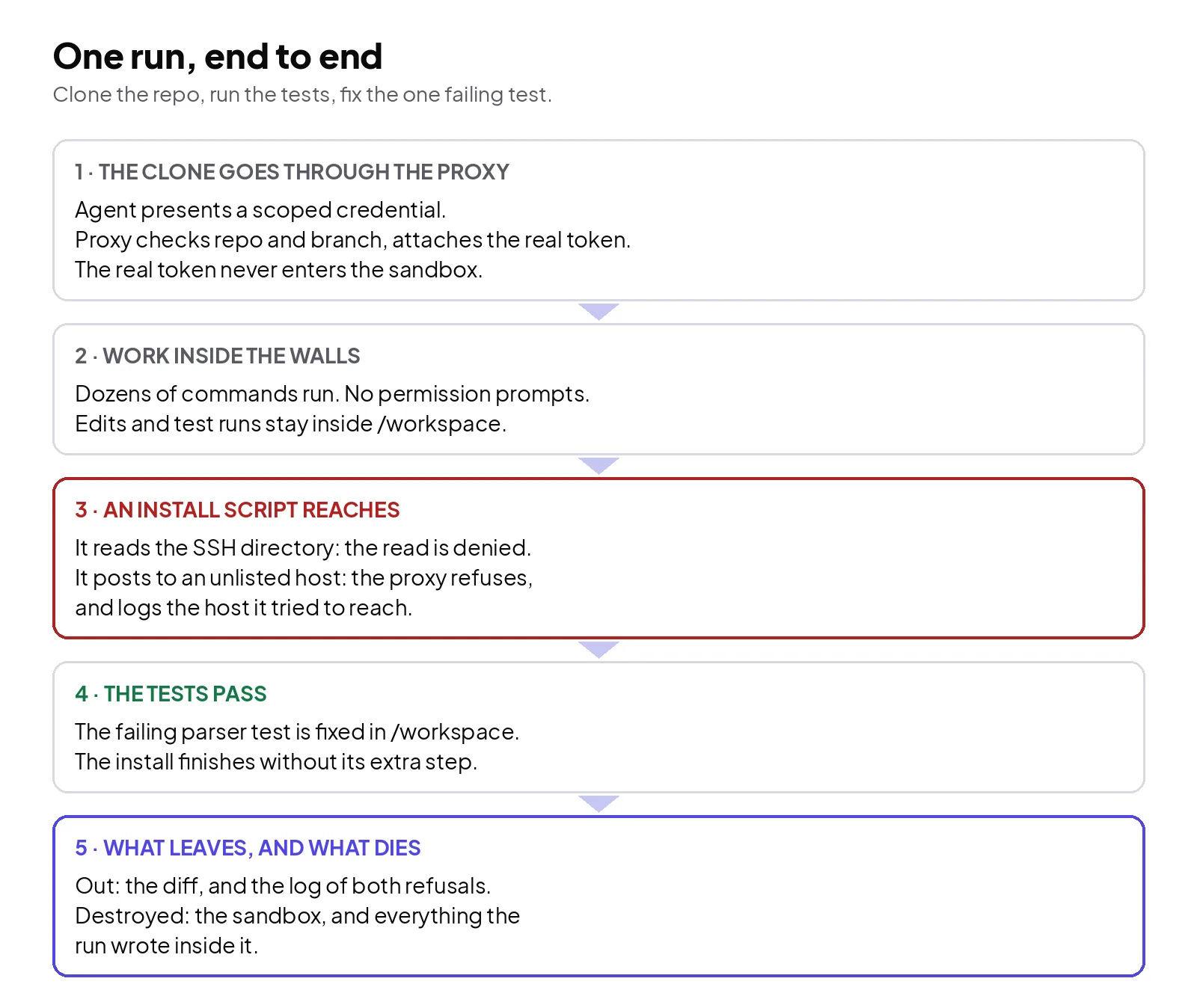
The agent's git client authenticates to the proxy with a scoped credential; the proxy verifies the repository and branch, attaches the real token, and forwards the request. The agent then edits files and runs the test suite inside the workspace — dozens of commands, zero permission prompts, because none of them can leave the boundary.
Mid-run, a dependency's install script does two things its author should not have asked for. It tries to read the SSH directory, and it tries to send a request to a host that is not on the allowlist. Inside the sandbox the first read is refused: that path was explicitly denied when the boundary was configured, so for this run it might as well not exist. The second request reaches the proxy and is refused, and the refusal is logged with the host named. The install continues without that step; the tests pass. The diff and the logs are the only things that leave; then the sandbox is destroyed, along with everything the install script wrote.
What a sandbox does not do
It does not judge intent inside the walls. An agent allowed to write to a repository can still write a bad change to that repository, and an agent allowed to call an API can still make a wrong call the API permits. Containment answers "how far can this reach?" It says nothing about "should it?" Reviews, evals and scoped permissions still carry that question.
Its coverage also has edges you have to read, not assume. In Claude Code, the documented boundary wraps shell commands; its file tools, MCP servers and hooks run outside it, following permission rules instead. A team that enables the sandbox and declares the agent contained has checked one door of several. Whatever runs the agent, the agent process itself included, needs to sit behind a boundary if the claim is going to hold.
Set the allowlist from a specification and it will be wrong in both directions: hosts the work needs will be missing, and hosts nobody needs will sit there because someone added them "just in case". Set it from observed traffic during a supervised run, then tighten. A proxy log that has never denied anything usually means the list is too wide to mean much.
Not every agent needs one, either. An agent with no shell, no code execution and a handful of scoped, read-only API tools has a small surface, and a sandbox around it buys little. Sandbox the execution. That is where the reach is.
Work with us
If your agents run code on machines that also hold production credentials, the useful question is not whether the model behaves — it is what a bad run can reach. Drawing that boundary, and setting the allowlist from your agents' real traffic, is deployment work we do. Tell us about it through Trida AI's intake.